
.svg)


Ellity's gift program offers a new way to reward customers for their loyalty. Ellity can automatically insert selected gifts into orders based on rules specified by the merchant.
Rules
The gift program contains a list of rules that govern the insertion of gifts into orders. The rules can be used to specify which purchases (as required) should contain which gifts.
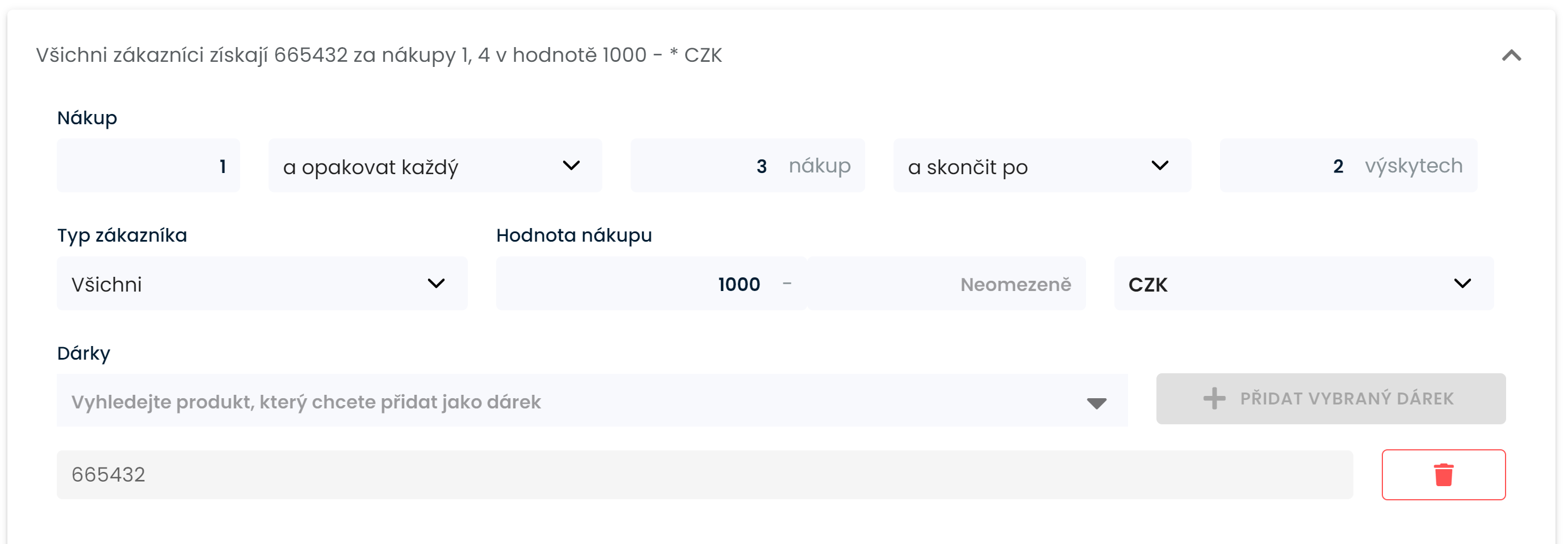
Purchase
Which purchase in the customer's purchase order is the purchase. It can be a single purchase in a sequence or it can be specified to repeat in the form of every, every second, every third ... purchase and either infinitely long or with a maximum number of occurrences.
Customer type
Whether it is a non-registered customer, a registered customer or all customers
Purchase value
Restrictions according to the value of the purchase.
Gifts
Search for the product by name or code and press the Add Selected Gift button. You can add multiple gifts, which will be added to the order if the condition is met
Gift display mode
Ellity offers two modes of working with gifts on the customer side. Either the gifts can be acknowledged in the cart or they can be hidden and will be a surprise for the customer when unwrapping the package.
How does it work?
The function behaves differently for logged-in and non-logged-in customers. If the customer is logged in, the gifts to be added to the cart are calculated when the customer enters the cart and if some are missing, they are added. At the same time, the gifts are informed that they are free gifts. The gift is displayed in the cart, in the summary and on the thank you page.
For a non-logged-in customer, gifts are calculated and added to the order only at the last step of the order once the email is entered. This is needed to get the data for the rules.
If the surprise mode is set, the customer will not see the gifts anywhere from the mentioned places.
